


Online learning has taken off like never before. More people are turning to the internet to share what they know and learn new skills, and it’s creating incredible opportunities for coaches, entrepreneurs, and creators.
If you’ve been thinking about building your own online course, you might be wondering where to start.
Questions like
- “What should I teach?”
- “How do I record my content?”
- “Which platform is best for hosting my course?”
This guide walks you through every step, from picking your topic to launching and selling your course. Along the way, you’ll see how CustomerHub makes it easier to bring your course to life without spending weeks wrestling with tech.
Our course creation features.
Why Create an Online Course?

An online course is more than just a product—it’s a way to scale your knowledge and impact. Here’s why so many creators are jumping in:
- Earn money while you sleep: Record once, sell repeatedly.
- Reach more people: Students can join from anywhere in the world.
- Stand out as an expert: Build trust and credibility in your field.
- Work on your terms: Design a business that fits your lifestyle.
Quick tip: Choose a topic you genuinely enjoy. Students can tell when you’re passionate about what you teach—and they’ll stick around because of it.
Step 1: Choose Your Course Topic
Your course needs to solve a specific problem for a clear audience. Begin by identifying what you know and what people are willing to pay for.
Read CustomerHub Testimonials
How to Find Your Topic
- Think about your skills: What do friends, clients, or coworkers often ask you for help with?
- Look at the market: Use Google Trends or browse Facebook Groups and Reddit to see what people are struggling with.
- Define your ideal student: Picture one person who will take your course. What’s the challenge they’re facing?
Examples:
- A fitness coach could focus on “strength training for new moms.”
- A marketer might teach “Instagram growth for small businesses.”
- A baker might create a course on “gluten-free desserts for beginners.”
CustomerHub tip: Use CustomerHub to collect feedback from potential students before you start building. A simple landing page can help you confirm that people are interested.
Step 2: Map Out Your Content
A structured course design not only holds students' attention but also facilitates easier course design.

Essentials of Course Layout
Module 1: Introduction and rudiments
Module 2: Core Components
Module 3: Interactive or Practical
Module 4: Higher-level materials and procedures
The Last Module: The Conclusion and What To Do Next
Planning tips:
- Keep lessons short and focused — 5 to 15 minutes is ideal.
- Add worksheets or templates to help students apply what they learn.
- Include quizzes or checkpoints so they can track progress.
Pro Tip: With CustomerHub’s drag-and-drop builder, you can visually organize your lessons and modules without needing a developer.
Step 3: Pick the Right Platform
Many creators make the mistake of juggling multiple tools — one for hosting videos, another for collecting payments, another for marketing. It’s exhausting and expensive.
CustomerHub brings everything under one roof so you can focus on teaching.
Why CustomerHub Works:
- Build and launch courses quickly.
- Manage memberships and track student progress.
- Accept payments through Stripe or PayPal.
- It has built-in marketing tools to grow your audience.
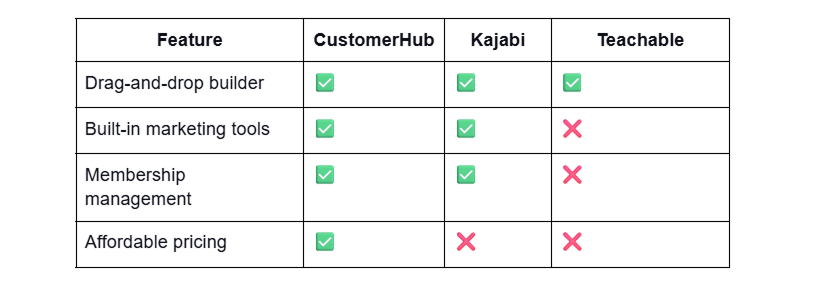
Instead of patching together different services, you can go from idea to launch in just hours, not weeks.
Step 4: Create Your Lessons

Now it’s time to bring your course to life. You don’t need a fancy studio setup to get started — focus on clear content and solid audio.
Basic Gear Checklist
- Camera or smartphone: Your phone is fine to start.
- Microphone: A simple USB or lapel mic makes a huge difference.
- Lighting: Use natural light or a low-cost ring light.
- Screen recording tool: Perfect for tutorials and slides.
Types of Content to Include
- Video lessons: Your main teaching method.
- Downloadable guides: Worksheets, templates, or checklists.
- Quizzes and assessments: Help students stay on track.
- Community spaces: A private group for discussion and support.
CustomerHub makes this easy: Upload videos, add downloads, and even build interactive quizzes—no extra tools required.
Step 5: Price Your Course
Picking the right price for your course isn’t just about numbers — it’s about matching the value of what you’re offering with what your students need.
Pricing trends
Single fee: A full package that allows indefinite use upon payment.
Recurring payment model: An earning model that provides payouts on a monthly basis.
Vertical price differentiation: There is always a low, middle, and high version of a product.
Free basic offer: Disseminate it prior to advancing to the next paid course.
Tip: Start with a discounted “founders launch” to reward early supporters and gather testimonials.
With CustomerHub, you can set up payments in minutes and sell to students worldwide.
Step 6: Launch and Market Your Course
Your course won’t sell itself — you need to get it in front of the right people.
Before Launch
- Offer a free resource to grow your email list.
- Share behind-the-scenes content on social media.
- Build excitement with a countdown landing page inside CustomerHub.
- Give early-bird discounts to encourage sign-ups.
After Launch
- Run ads on Facebook or Instagram.
- Partner with affiliates who already serve your target audience.
- Write SEO-friendly blogs to drive organic traffic.
- Host live webinars to showcase your expertise.
Step 7: Keep Students Coming Back
A great course isn’t just about teaching — it’s about creating a community and supporting your students as they grow.
Ideas to Boost Engagement
- Host live Q&A calls or group coaching sessions.
- Add progress tracking and badges to make learning fun.
- Build a private membership space inside CustomerHub.
- Celebrate milestones with personalized emails.
With CustomerHub’s automation tools, you can keep students motivated without spending hours managing it manually.
Why Creators Love CustomerHub
Here’s what makes CustomerHub stand out:
- Launch your course quickly, even with zero tech skills.
- Manage everything—content, payments, marketing—from one dashboard.
- Grow without worrying about outgrowing your platform.
- Spend your time teaching instead of troubleshooting software.
Frequently Asked Questions
Do I need to be good with technology to build a course?
Nope! CustomerHub is built so anyone can get started with simple drag-and-drop tools.
How long does it take to launch a course?
Many creators publish their first course in 1–2 weeks once their content is ready.
Can I sell to people in other countries?
Absolutely. CustomerHub works with trusted payment processors like Stripe and PayPal.
Your Next Step
You don’t need to wait months or spend thousands of dollars to create a professional online course.
With CustomerHub, you can build, launch, and grow — all in one place.
Ready to share your knowledge with the world?


